How To Install Natural Vision Remastered Mod In GTA 5 ?
The Natural Vision Remastered mod changes the graphics of GTA 5 and makes the game look much more realistic. This guide will let you know how to download the Natural Vision Remastered mod.
- Open the following link and Download Natural Vision Remastered.
https://www.gta5-mods.com/misc/naturalvision-photorealistic-gtav

- Extract the downloaded Natural Vision Remastered folder.

- After that, you will need to open the "Main Files" folder.

- Copy the two timecyclemods named files and paste them in the Grand Theft Auto V directory.

- Select the "NaturalVision Installer.oiv" file, drag and drop it on OpenIV(running) and install the program in the mods folder.

- After that, navigate to the Optional Add-Ons and then open the 1.ENB Only folder.

- Open the "Normal Preset (Recommended)" folder.

- Open up the "++READ THIS FIRST++" text document and open the link posted in it.

- Download the ENB Only DLL Files.

- Copy the files except Text Document and paste them in the Grand Theft Auto V directory.
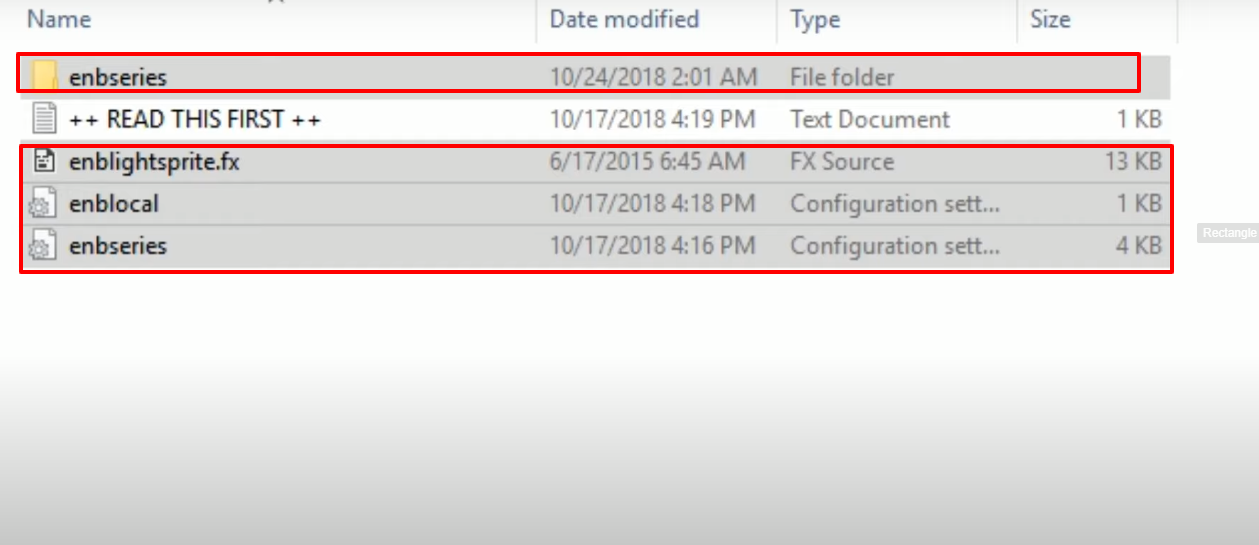
- Open the ENB Only DLL Files downloaded folder.

- Copy the files and paste them in the Grand Theft Auto V directory.

- Launch the game, explore and enjoy.
